
Project time tracking that shows where the work and budget go.
WeWorked helps teams track time by project, task, employee, budget, and billable status so managers can see what work is happening, control costs, approve time, and create accurate reports or invoices.
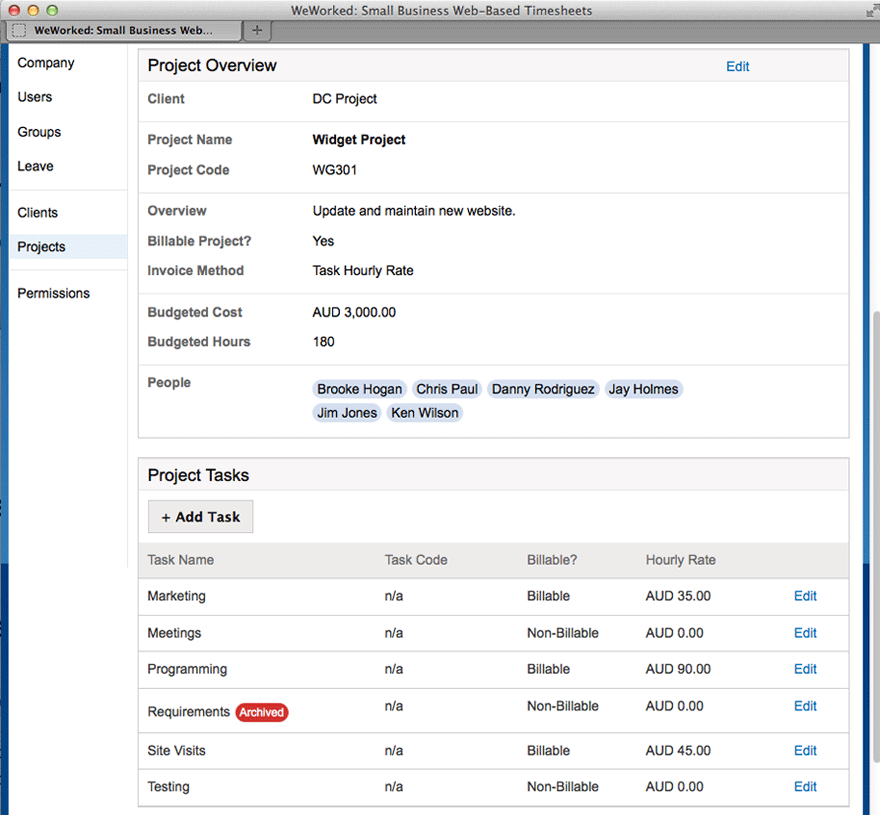
Why WeWorked is the best timesheet software for project teams.
WeWorked stands out because it connects everyday time entry to the project, approval, reporting, budget, and billing work managers need to run a team.
Simple for employees
Employees can enter time quickly from the web, mobile apps, or a clock-in workflow without navigating a complicated project management system.
Useful for managers
Managers can review time by project, task, person, budget, and billable status before payroll, client reporting, or invoicing.
Built for accountability
Approval workflows, edit history, project assignments, and reporting help teams keep accurate records and support audit-ready timekeeping.
Ready for billing
Approved hours and expenses can flow into reports, invoices, and QuickBooks Online-ready accounting workflows.
Flexible as teams grow
Start with basic online timesheets, then add approvals, leave, expenses, permissions, project budgets, invoices, and integrations.
Focused on real work
WeWorked avoids unnecessary complexity and keeps the core workflow centered on accurate time, clear reporting, and getting paid correctly.
Project tracking features.
WeWorked gives managers the structure they need without making time entry complicated for employees.
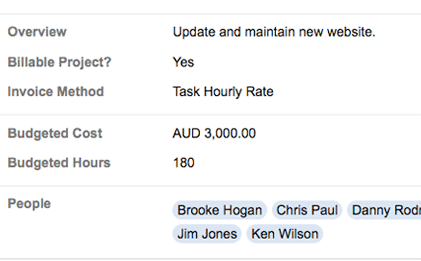
Budgets and alerts
Track project costs in real time. Set budget limits based on hours or dollar value and receive alerts before teams exceed thresholds.
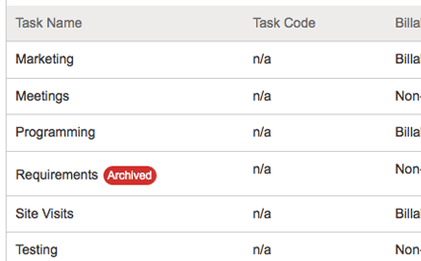
Custom tasks by project
Create task lists tailored to each project, from detailed roles like development and QA to simple entries like hours worked.
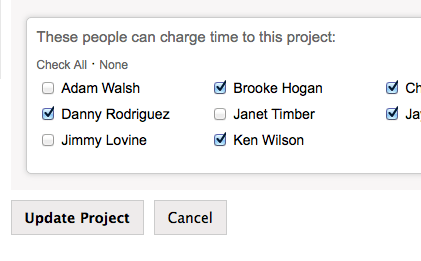
Project team access
Control who can enter time on each project while preserving historical reports when someone is removed.
"Before WeWorked, we barely knew how the team spent their time. Now we have detailed tasks that show how the work is getting done."
- ✓ Track labor by project, task, person, and billable status
- ✓ Keep project time records available for reporting
- ✓ Use reports for payroll, clients, billing, and management
- ✓ Pair project tracking with approvals, leave, expenses, and invoices
More than project time tracking.
Teams can start with project timesheets and expand into the broader WeWorked workflow as needed.
Timesheet approvals
Review and approve time before payroll, invoicing, or project reporting.
Invoicing from time
Turn approved project hours and expenses into client-ready invoices.
QuickBooks workflows
Support accounting handoffs with QuickBooks Online-ready time and invoice workflows.
Project time tracking FAQ
Answers for teams comparing online timesheet software for project reporting and budget control.
Can I track time by project and task in WeWorked?
Yes. WeWorked lets teams organize time entries by project and custom task so managers can see how labor is distributed.
Does WeWorked offer budget tracking?
Yes. You can set budget limits by hours or cost and receive alerts when projects approach or exceed those limits.
Can I control who enters time on each project?
Yes. You can assign specific team members to projects and remove access without deleting their historical time records.
Can project time be used for invoices?
Yes. Approved billable project time and expenses can be used to create invoices and support accounting workflows.